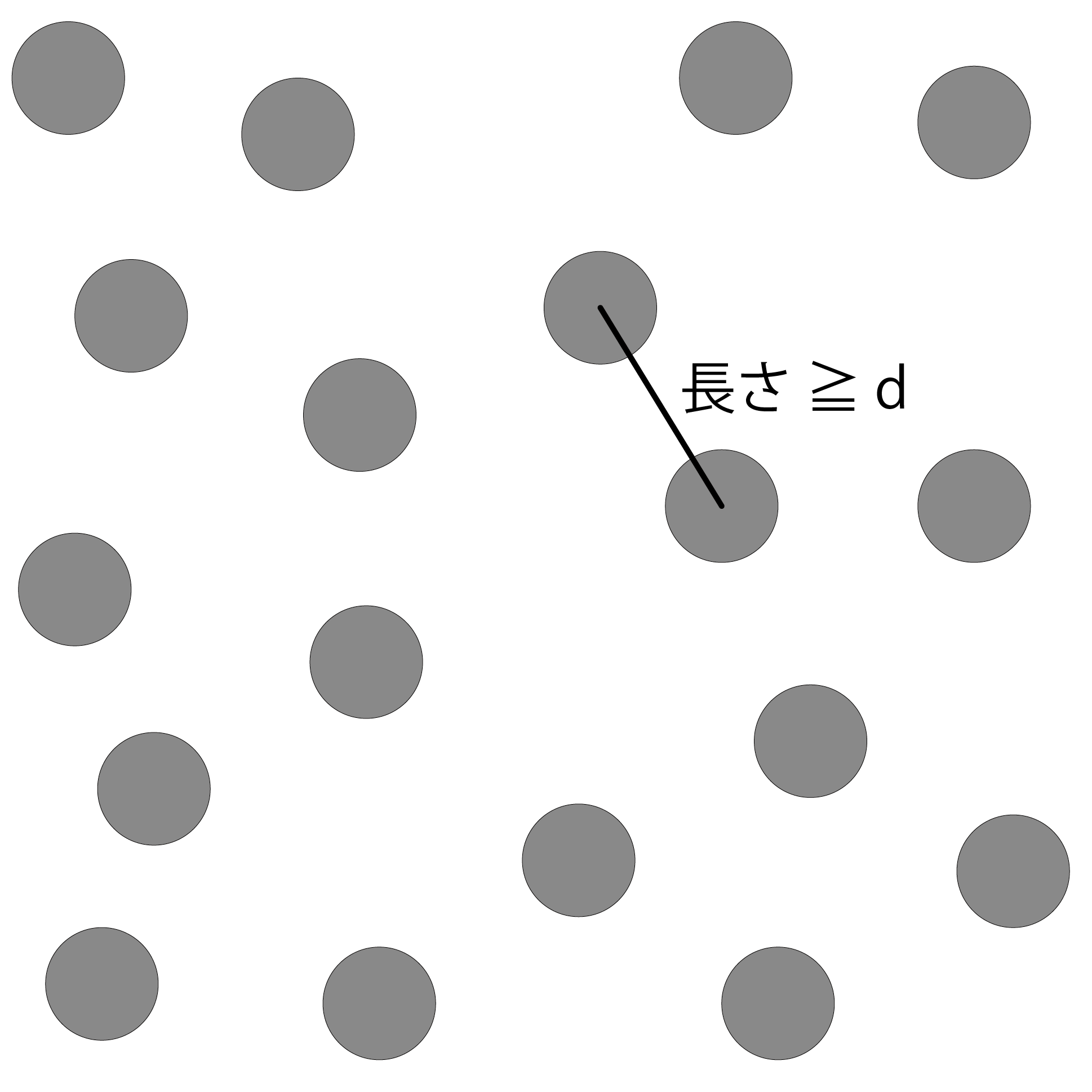
Figure 7.1: Plot random points
This chapter provides an overview of Poisson Disk Sampling (hereinafter referred to as "PDS") and an explanation of the CPU implementation algorithm.
Fast Poisson Disk Sampling in Arbitary Dimensions (high-speed Poisson disk sampling in any dimension: hereinafter, "FPDS" is used) is adopted for the implementation in the CPU. This algorithm was proposed by Robert Bridson of the University of British Columbia in a 2007 paper submitted to SIGGRAPH.
Some people may not know what PDS is in the first place, so this section will explain PDS.
First, plot a large number of points in a suitable space. Next, consider a distance d greater than 0 . At this time, as shown in Fig . 7.1 , the distribution in which all the points are at random positions but all the points are separated by at least d or more is called the Poisson-disk distribution. In other words, even if two points are randomly selected from Figure 7.1 , the distance between them will not always be less than d in any combination . Sampling such a Poisson-disk distribution, in other words, generating a Poisson-disk distribution by calculation, is called PDS.
With this PDS, you can get a random point cloud with uniformity. Therefore, it is used for sampling in filtering processing such as antialiasing, and sampling for determining composite pixels in texture composition processing.
Figure 7.1: Plot random points
The biggest feature of FPDS is that it is dimension-independent. Most of the methods proposed so far are based on the assumption of two-dimensional calculation, and it has not been possible to efficiently perform three-dimensional sampling. Therefore, FPDS was proposed to perform high-speed calculations in any dimension.
FPDS can be calculated in O (N) and can be implemented based on the same algorithm in any dimension. This section describes the FPDS process step by step.
Three parameters are used in the calculation of FPDS.
These parameters can be freely entered by the user. The above parameters are also used in the following explanations.
Divide the sampling space into Grids to speed up the calculation of the distance between points. Here, the number of dimensions of the sampling space is n , and the size of each divided space (hereinafter referred to as "cell") is \ frac {r} {\ sqrt {n}} . Figure 7.2 As shown in \ sqrt {n} is, n the length of each axis in the dimension represents the absolute value of the first vector.
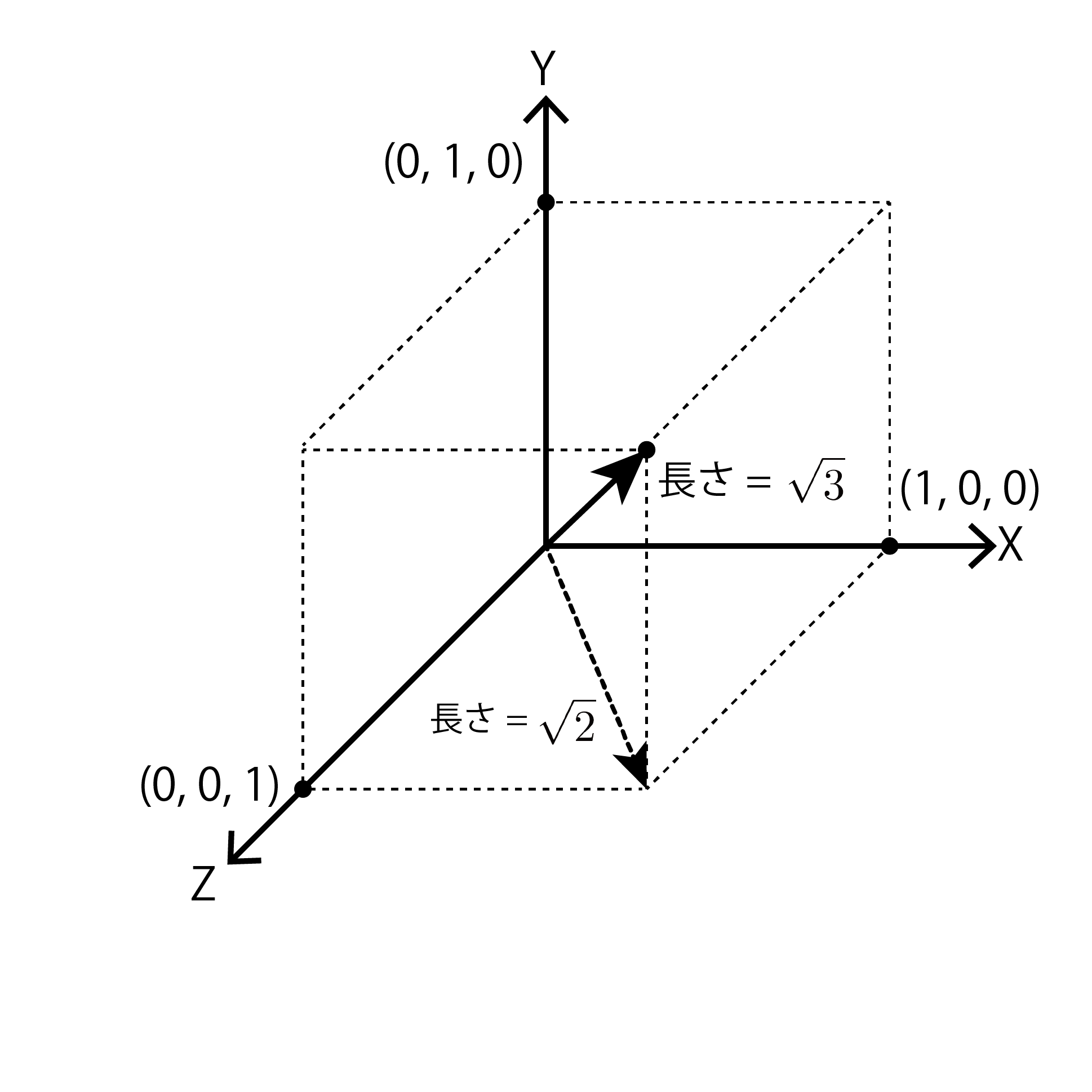
Figure 7.2: When n = 3
Then, the sampled points belong to the cell that contains the coordinates. Since the size of each cell is \ frac {r} {\ sqrt {n}} , the center distance between adjacent cells is also \ frac {r} {\ sqrt {n}} . In other words, by dividing the space by \ frac {r} {\ sqrt {n}} , as you can see from Figure 7.3 , at most one point belongs to each cell. Furthermore, when searching the neighborhood of a certain cell, by searching the surrounding cells by \ pm {n} , all the cells within the minimum distance r can be searched.
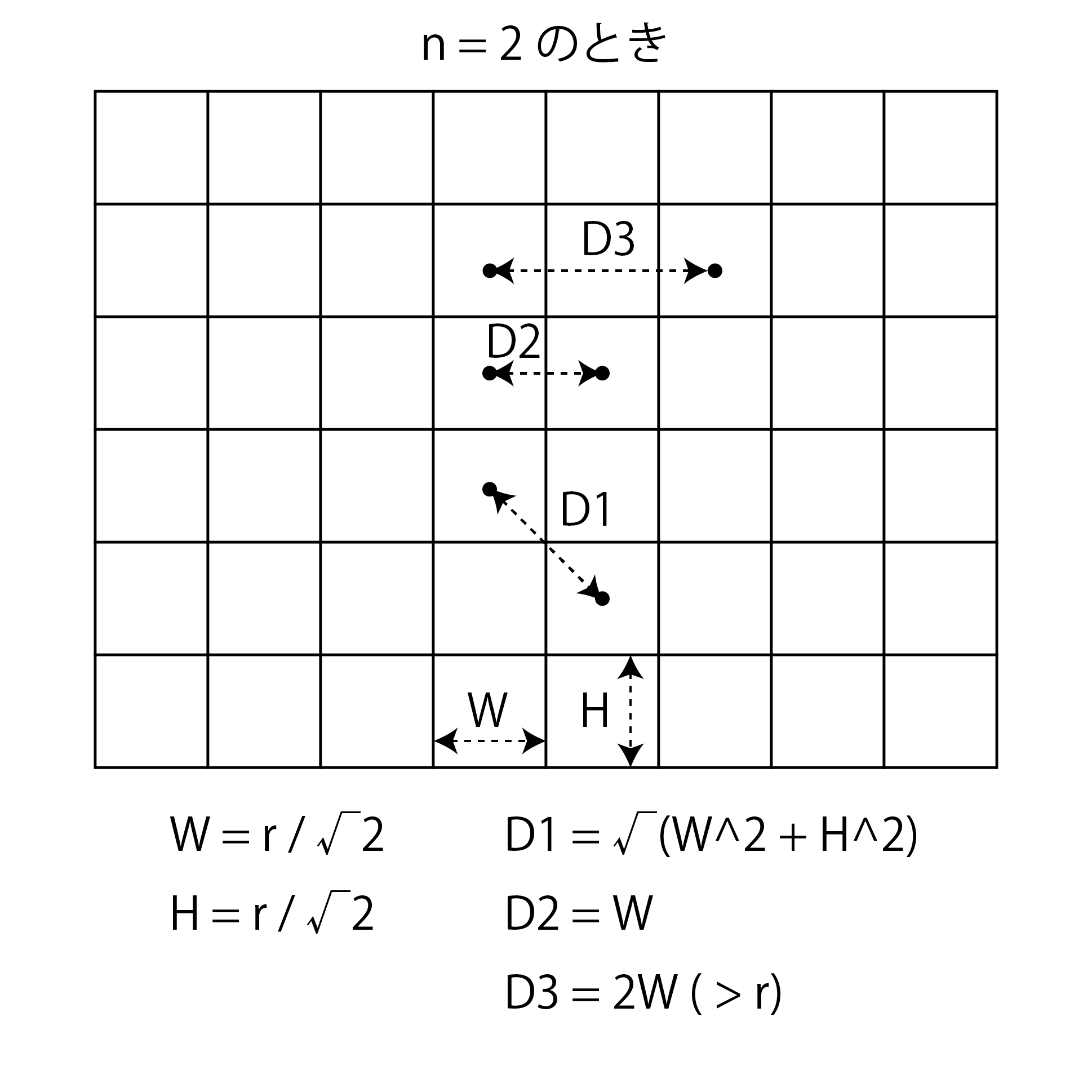
Figure 7.3: Partition of a set at n = 2
Also, this Grid can be represented by an n-dimensional array, so it is very easy to implement. By assigning the sampled point to the cell corresponding to its coordinates, it is possible to easily search for other points that exist nearby.
// Get a 3D array that represents a 3D grid
Vector3?[, ,] GetGrid(Vector3 bottomLeftBack, Vector3 topRightForward
    , float min, int iteration)
{
    // Sampling space
    var dimension = (topRightForward - bottomLeftBack);
    // Multiply the minimum distance by the reciprocal of √3 (I want to avoid division)
    var cell = min * InvertRootTwo;

    return new Vector3?[
        Mathf.CeilToInt(dimension.x / cell) + 1,
        Mathf.CeilToInt(dimension.y / cell) + 1,
        Mathf.CeilToInt(dimension.z / cell) + 1
    ];
}

// Get the Index of the cell corresponding to the coordinates
Vector3Int GetGridIndex(Vector3 point, Settings set)
{
    // Calculate Index by dividing the distance from the reference point by the cell size
    return new Vector3Int(
        Mathf.FloorToInt((point.x - set.BottomLeftBack.x) / set.CellSize),
        Mathf.FloorToInt((point.y - set.BottomLeftBack.y) / set.CellSize),
        Mathf.FloorToInt((point.z - set.BottomLeftBack.z) / set.CellSize)
    );
}
Calculate the first sample point that will be the starting point for the calculation. At this point, no matter which coordinates are sampled, there is no other point closer than the distance r, so one completely random coordinate is determined.
Based on the coordinates of this calculated sample point, it belongs to the corresponding cell and is added to the active list and sampling list. This active list is a list that stores the starting points for sampling. Sampling will be performed sequentially based on the points saved in this active list.
// Find one random coordinate
void GetFirstPoint(Settings set, Bags bags)
{
    var first = new Vector3(
        Random.Range(set.BottomLeftBack.x, set.TopRightForward.x),
        Random.Range(set.BottomLeftBack.y, set.TopRightForward.y),
        Random.Range(set.BottomLeftBack.z, set.TopRightForward.z)
    );
    var index = GetGridIndex(first, set);

    bags.Grid[index.x, index.y, index.z] = first;
    // Sampling list, eventually returning this List as a result
    bags.SamplePoints.Add(first);
    // Active list, sampling around this List
    bags.ActivePoints.Add(first);
}
Randomly select Index i from the active list and let the coordinates stored in i be x_i . (Of course, at the very beginning , i is 0 because it is only the point generated in "7.3.3 Calculate the initial sample points" .)
With this x_i as the center, other points will be sampled with respect to nearby coordinates. By repeating this, the entire space can be sampled.
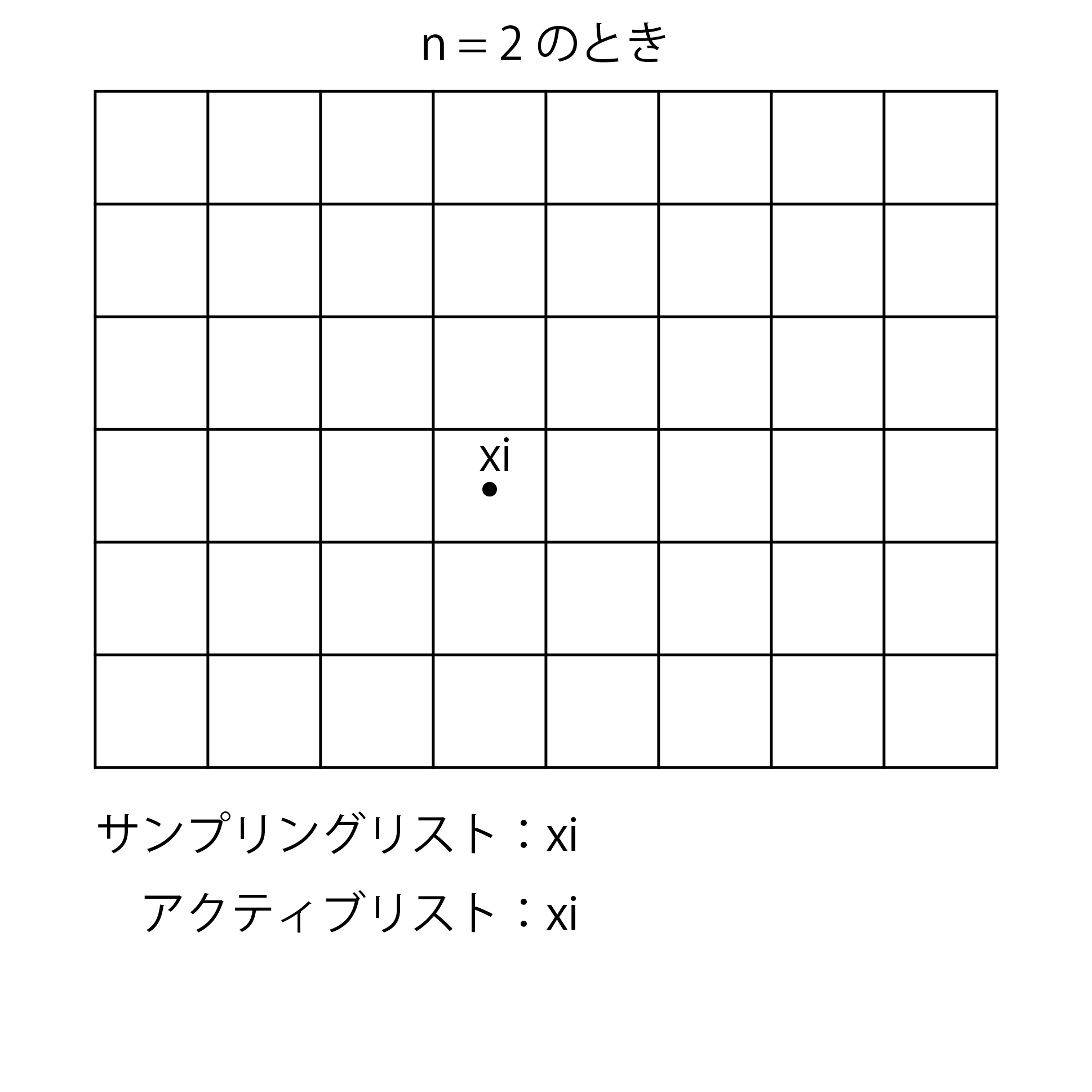
Figure 7.4: Select initial sampling point
// Randomly select points from the active list
var index = Random.Range(0, bags.ActivePoints.Count);
var point = bags.ActivePoints[index];
Random coordinates x ^ {\ prime} _i are calculated within an n-dimensional sphere (a circle for 2D and a sphere for 3D) with a radius of r or more and 2r or less centered on x_i . Next, check if there are other points with a distance closer than r around the calculated x ^ {\ prime} _i .
Here, the distance calculation for all other points is a process with a higher load as the number of other points increases. Therefore, in order to solve this problem, the Grid generated in "7.3.2 Dividing the sampling space into Grid" is used, and the calculation is performed by examining only the cells around the cell to which x ^ {\ prime} _i belongs. Reduce the amount. If there are other points in the surrounding cells, x ^ {\ prime} _i is discarded, and if there are no other points, x ^ {\ prime} _i belongs to the corresponding cell, and the active list and sampling list Add to.
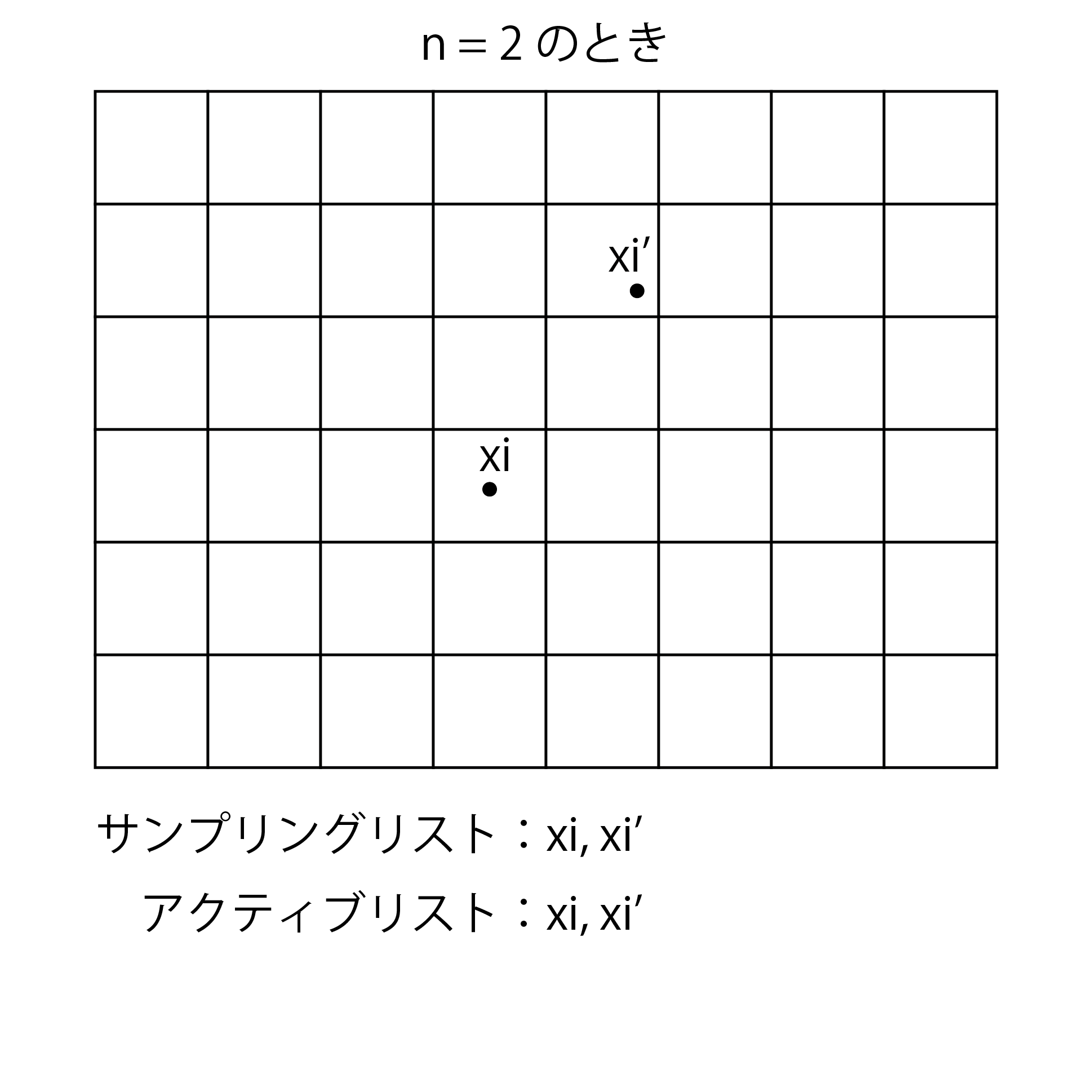
Figure 7.5: Sampling other points relative to the initial sampling point
// Find the next sampling point based on the point coordinates
private static bool GetNextPoint(Vector3 point, Settings set, Bags bags)
{
    // Find a random point in the range r ~ 2r around the point coordinates
    var p = point +
        GetRandPosInSphere(set.MinimumDistance, 2f * set.MinimumDistance);

    // If it is out of the sampling space, it will be treated as sampling failure.
    if(set.Dimension.Contains(p) == false) { return false; }

    var minimum = set.MinimumDistance * set.MinimumDistance;
    var index = GetGridIndex(p, set);
    var drop = false;

    // Calculate the range of Grid to search
    var around = 3;
    var fieldMin = new Vector3Int(
        Mathf.Max(0, index.x - around), Mathf.Max(0, index.y - around),
        Mathf.Max(0, index.z - around)
    );
    var fieldMax = new Vector3Int(
        Mathf.Min(set.GridWidth, index.x + around),
        Mathf.Min(set.GridHeight, index.y + around),
        Mathf.Min(set.GridDepth, index.z + around)
    );

    // Check if there are other points in the surrounding Grid
    for(var i = fieldMin.x; i <= fieldMax.x && drop == false; i++)
    {
        for(var j = fieldMin.y; j <= fieldMax.y && drop == false; j++)
        {
            for(var k = fieldMin.z; k <= fieldMax.z && drop == false; k++)
            {
                var q = bags.Grid[i, j, k];
                if(q.HasValue && (q.Value - p).sqrMagnitude <= minimum)
                {
                    drop = true;
                }
            }
        }
    }

    if(drop == true) { return false; }

    // Adopted because there are no other points in the vicinity
    bags.SamplePoints.Add(p);
    bags.ActivePoints.Add(p);
    bags.Grid[index.x, index.y, index.z] = p;
    return true;
}
With x_i at the center, only one point was sampled in "7.3.5 Sampling" , but this is repeated k times. If x_i for k repeated times, if you were not able to sample even one point, x_i to remove from the active list.

Figure 7.6: K = 7 when the
Then, when the repetition of k is finished, it returns to "7.3.4 Select a reference point from the active list" . You can sample the entire space by repeating this until the active list reaches zero.
// Repeat sampling
public static List<Vector3> Sampling(Vector3 bottomLeft, Vector3 topRight,
    float minimumDistance, int iterationPerPoint)
{
    var settings = GetSettings (
        bottomLeft,
        topRight,
        minimumDistance,
        iterationPerPoint <= 0 ?
            DefaultIterationPerPoint : iterationPerPoint
    );
    var bags = new Bags()
    {
        Grid = new Vector3?[
            settings.GridWidth + 1,
            settings.GridHeight + 1,
            settings.GridDepth + 1
        ],
        SamplePoints = new List<Vector3>(),
        ActivePoints = new List<Vector3>()
    };
    GetFirstPoint(settings, bags);

    do
    {
        var index = Random.Range(0, bags.ActivePoints.Count);
        var point = bags.ActivePoints[index];

        var found = false;
        for(var k = 0; k < settings.IterationPerPoint; k++)
        {
            found = found | GetNextPoint(point, settings, bags);
        }

        if(found == false) { bags.ActivePoints.RemoveAt(index); }
    }
    while(bags.ActivePoints.Count > 0);

    return bags.SamplePoints;
}
In other words, if you briefly explain the overall flow
It means that. Since parallelization is not proposed in this algorithm, if the sampling space Rn is wide or the minimum distance r is small, a certain amount of calculation time is required, but it is easy to sample in any dimension. , A very attractive advantage.
By the processing up to this point , the sampling result can be obtained as shown in Fig. 7.7 . This image is a circle created and placed by Geometry Shader at the sampled coordinates. You can see that the circles do not overlap and are filled to the full extent.
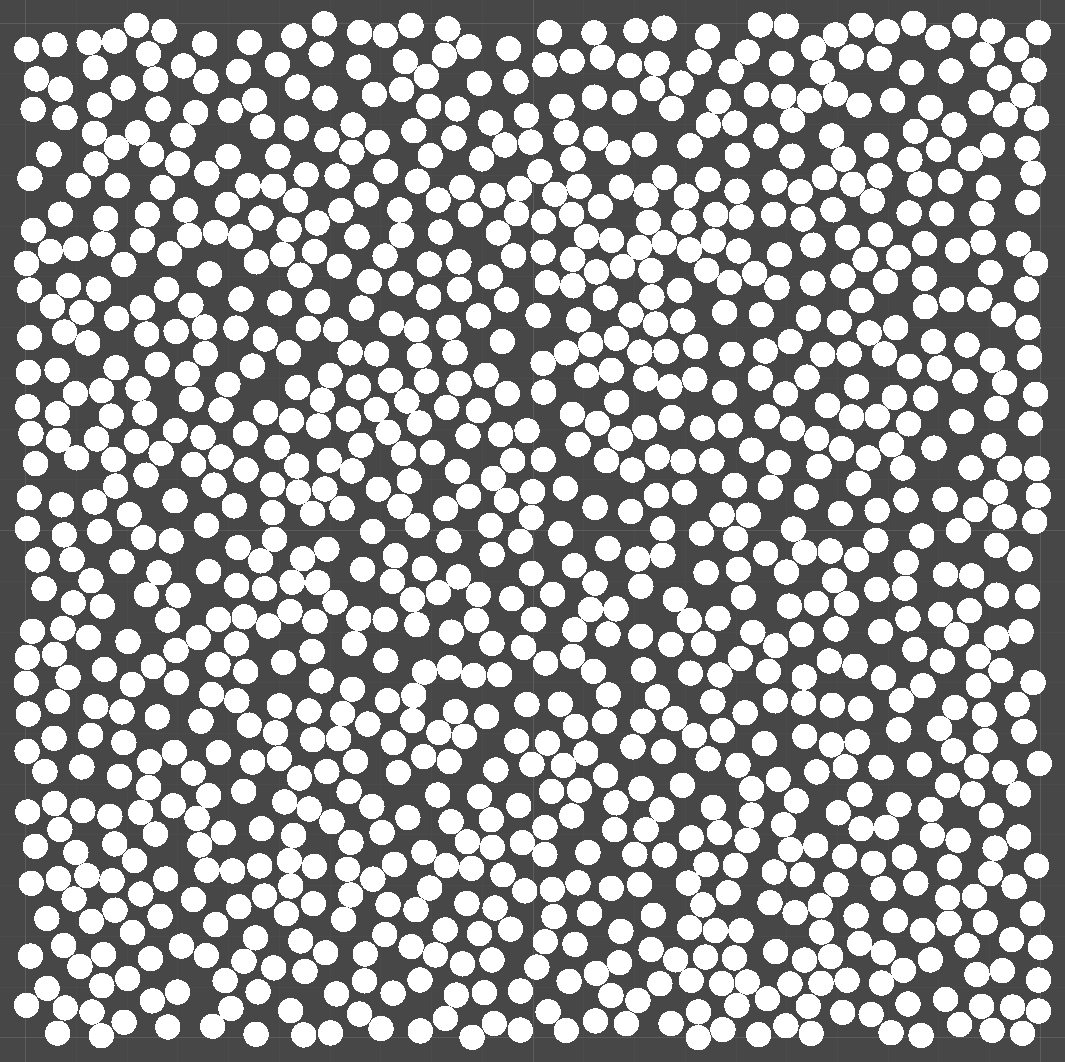
Figure 7.7: Visualization of sampling results
As I mentioned at the beginning, Poisson disc sampling is used in a wide range of places, from antialiasing and image composition to image effects such as Blur and evenly spaced objects. It doesn't give you a clear visual result on its own, but it's often used behind the high-quality visuals we usually see. It can be said that it is one of the algorithms that is worth knowing when doing visual programming.